Lingerlet is a calm digital letter-formatting service for your letters written to family, friends, or yourself.
After a busy day, sit down somewhere quiet and write to someone you miss — then take the letter away as a PDF, or optionally share a gated link.
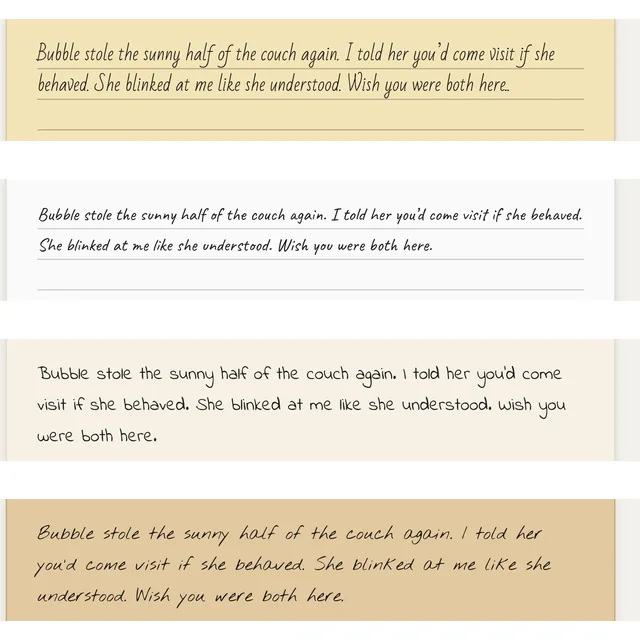
Digital letters that still feel like paper
- Handwritten-style fonts
- Letter-paper backgrounds
- Letter-sized sheets
- Export as PDF
Quick start
Write a letter yourself, or open one someone shared with you.
Want to write a nicely formatted digital letter?
-
Open the draft page
Go to Draft a digital letter — no sign-in required to write.
-
Type or paste your letter
Enter the content you want on the letter sheets.
-
Adjust font or paper style
Pick a handwritten-style font and a letter-paper background that fits the mood.
-
Save a PDF if you want your own copy
Export the formatted letter as a PDF and keep it on your device. You can send that PDF to your contacts yourself.
-
Optional: create a shareable link
Sign in with Google, create a shareable link for a Gmail recipient you choose, and send that link yourself. Lingerlet does not email the recipient for you.
Someone shared a shareable link with me
-
Open the link in a browser
Use the shareable link you received (a URL like
/view-digital-letter/…). A laptop, desktop, or tablet is recommended. -
Sign in with the correct Google account
The default Gmail address of the Google account you use must match what the sender specified.
-
Wait for delivery timing
Letter content becomes viewable about 2–3 days after the link is created — similar to real-world mail delivery. Before then, you may see when it arrives, but not the letter itself.
-
Export a PDF while you can
Shared letter content is kept only about 90 days after it becomes viewable. Export the letter as a PDF to your local device so you keep a lasting copy.
Frequently asked questions
A list of FAQs for helping understand the service at a glance
Why write a digital letter here instead of a physical one?
- Faster to draft and revise on a keyboard than with pen and paper.
- Same letter look, less logistics. Handwritten-style fonts, letter paper, and letter-sized pages — without buying stationery, finding stamps, or waiting on a post office.
- Keep a lasting copy as a PDF on your own device. You can send that PDF yourself, or optionally create a shareable link for a Gmail recipient (Lingerlet does not email them for you). Shared letters are not kept forever on Lingerlet — export while you can.
- Saves paper.
- Free to use on the current launch: write and export a PDF without signing in; optional shareable links are free too, subject to usage limits (see quotas FAQ).
How is Lingerlet different from other digital letter services (e.g. Slowly or Lettre.app)?
- Works in the browser. Lingerlet is a web app — open it on a laptop, desktop, or tablet. There is no dedicated iOS or Android app to download from an app store.
- Write and export a PDF without signing in. Format the letter with handwritten-style fonts and letter paper, then save a PDF. You can send that styled PDF to your contacts through whatever channel you already use (email, messaging, and so on).
- Letter look is the product. The focus is digital stationery — paper styles, handwriting fonts, and letter-sized pages — not a social feed, pen-pal discovery, or chat-style inbox.
- Optional gated sharing, not a mailbox network. If you want, you can create a shareable link for one Gmail recipient after Google sign-in. You send the link yourself; Lingerlet does not email them. Viewing is delayed (about 2–3 days) and the shared copy is kept only about 90 days after it becomes viewable — so a PDF remains the lasting keepable copy.
- Built for people you already know. There is no stranger matching or “find a pen pal” directory. You choose who gets a PDF or a link.
What usage limits apply?
Drafting a letter and keeping a formatted PDF for yourself are the core free path. Those actions are not rate-limited:
| Area | Limit |
|---|---|
| Download a formatted letter as PDF to your device | Unlimited |
| Send a formatted letter as PDF via system share (for example AirDrop, Mail, or Messages on many iOS devices) | Unlimited (where your browser offers Share PDF file) |
| Save a formatted letter as PDF into apps such as Notes on iOS | Unlimited (via Share PDF file, where available) |
Optional shareable links (Google sign-in; one Gmail recipient; delayed viewing) do have product limits. Non-exhaustive reference list (see disclaimer below):
| Area | Limit |
|---|---|
| Shareable links you create | Up to 4 per rolling 24 hours (per Google sign-in) |
| Letter body when creating a shareable link | Up to 20,000 characters (not enforced while drafting or exporting a PDF) |
| Shareable-link recipient | One Gmail address per link (local part you enter; other domains not supported) |
| Shared letter retention | About 90 days after the letter becomes viewable, then deleted |
We may change these limits at any time, including without email notice. This list is for reference only. We aim to stay consistent with the live product, but the FAQ may lag or contain minor discrepancies. The Service UI and Terms of Service control if anything conflicts.